 OromMac

Keep your Mac awake.
A small switch in your menu bar that stops your Mac from falling asleep. Leave it on, or pick how long. Free.
What it's for
The moments your Mac shouldn't nod off.
- A long download, a backup or a build stops halfway because the Mac went to sleep.Turn Cruise Control on and it keeps going until you're done.
- The screen goes dark in the middle of a talk, a recipe or a dashboard on the wall.The display stays on too, until you switch it off.
- You only need it for a while, and you'll forget to turn it off.Set a timer: two hours, or until 5:00. Then the Mac sleeps as usual.
How it works
Click the dial in the menu bar. That's the whole app.
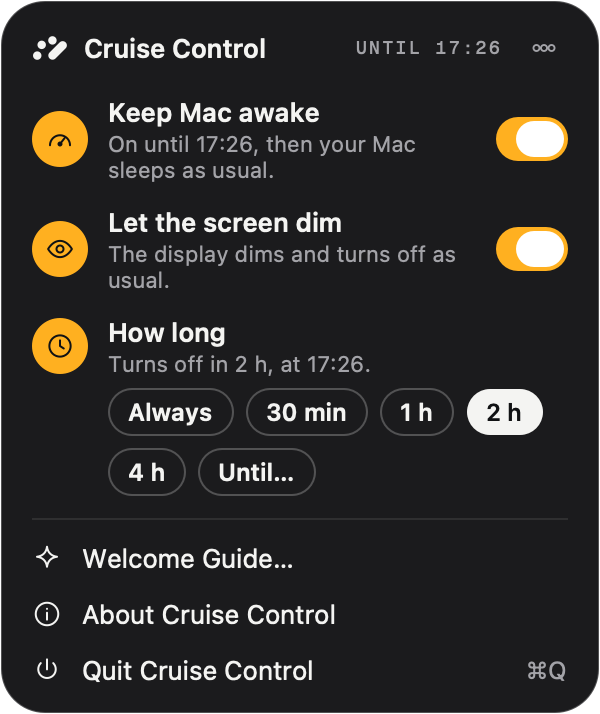
- Keep Mac awakeThe main switch. It's on when the app opens, so your Mac stays up right away.
- How longAlways, 30 min, 1 h, 2 h, 4 h, or until a time like 5:00. Then your Mac sleeps as usual.
- Let the screen dimThe display dims and turns off as usual, while downloads, builds and music keep going.
Inspired by
The app that had the idea first deserves the credit.
Amphetamine ↗
by William Gustafson
The keep-awake app with every option you could want. Cruise Control is my own, much smaller take, written from scratch: the switch, a timer, and nothing else to set up.
Questions
Anything else? Email me.
Is it really free?
Yes. No trial, no license key, no account. It's a small thank-you from the person who makes Mission Boost.
Does it keep a MacBook awake with the lid closed?
Yes. While it's on, the Mac doesn't sleep at all: not when you close the lid, and not from Sleep in the Apple menu. When you switch it off or quit, normal sleep comes straight back.
What if the battery runs low?
On battery, Cruise Control turns itself off at 10%, so a Mac left awake in a bag doesn't run until it's empty. You can change that under the "…" button in the panel.
Does it need any permissions?
Once. Keeping a closed Mac awake is a system setting only an administrator may change, so Cruise Control has a small helper that you allow once in System Settings, Login Items. Until then it still stops idle sleep, the way the built-in caffeinate command does. The helper puts normal sleep back whenever Cruise Control turns off, quits or crashes.
Can the screen turn off while the Mac keeps working?
Yes. Click the dial and switch on "Let the screen dim". The display dims and sleeps as usual, and downloads, builds and music keep going.
Is there a quicker way to switch it?
Option-click the dial to turn it on or off without opening the panel. The dial shows which it is: needle up when it's on, at rest when it's off.
Can I do this without an app?
Yes. Run caffeinate -d in Terminal and keep the window open, or see how to keep your Mac awake for every built-in way. Cruise Control is the same thing as a switch you don't have to remember.
Get Cruise Control
Free. Drag it to Applications and click the dial in your menu bar.